Wednesday, September 12, 2012

Ganesh Sloga App

Ganesh Sloga is now at your fingerprints
Make smarten your iPhone and get an experience about Lord Ganesh.This is a tribute to Lord Ganesha son of Lord Shiva.

Thia application is specially designed for devotees who follows ganesh Chaturthi and Sankashti Vrat which will falls on the fourth day after Purnima or full moon.

Application is divided into four parts:

(1) Ganesh Kavacham:
- In this part, you listen to the Ganesh Kavacham and chant along.
- Both Kavacham text and Kavacham can be viewed / read  in Devanagiri/sanskrit,Tamil,Telugu,Kannada,Malayalam and English
- Pictorial representation of Kavacham Text
- Rich-quality, soothing and devotional Ganesh Kavacham audio played in the background for save your battery life.
- Kavacham text, Pictorial representation text synchronized with Kavacham audio
- Easy for Fast Forward , Rewind the audio & hear the song where you left by just sliding the audio timer.

(2) Ganesh Ashtottra sata Namavalli:
- In this part, you listen to the Ganesh  Ashtottra sata Namavalli and chant along.
- Both  Ashtottra sata Namavalli text and  Ashtottra sata Namavalli can be viewed / read  in Devanagiri/sanskrit,Tamil,Telugu,Kannada,Malayalam and English
- Pictorial representation of Ashtottra sata Namavalli Text
- Rich-quality, soothing and devotional Ganesh  Ashtottra sata Namavalli audio played in the background for save your battery life.
- Ashtottra sata Namavalli text, Pictorial representation text synchronized with  Ashtottra sata Namavalli audio
- Easy for Fast Forward , Rewind the audio & hear the song where you left by just sliding the audio timer.

(3) Ganesh Pancha Ratnam:
- In this part, you listen to the Ganesh Pancha Ratnam and chant along.
- Both Pancha Ratnam text and Pancha Ratnam can be viewed / read  in Devanagiri/sanskrit,Tamil,Telugu,Kannada,Malayalam and English
- Pictorial representation of Pancha Ratnam Text
- Rich-quality, soothing and devotional Ganesh Pancha Ratnam audio played in the background for save your battery life.
- Pancha Ratnam text, Pictorial representation text synchronized with Pancha Ratnam audio
- Easy for Fast Forward , Rewind the audio & hear the song where you left by just sliding the audio timer.

(4) About Ganesh Chaturthi When why & how:
It will have all details about When,Why & how to worship on ganesh chaturthi and Sankashti Vrat.


Carry your Ganesh Sloga application wherever you go in your iPhone / ipad and pay tribute to the deity at any time and place.

Tuesday, September 4, 2012

Good Practices Prevent Memory-Related Problems

Objective-C provides two methods of application memory management.
  1. In the method described in this guide, referred to as “manual retain-release” or MRR, you explicitly manage memory by keeping track of objects you own. This is implemented using a model, known as reference counting, that the Foundation class NSObject provides in conjunction with the runtime environment.
  2. In Automatic Reference Counting, or ARC, the system uses the same reference counting system as MRR, but it inserts the appropriate memory management method calls for you at compile-time. You are strongly encouraged to use ARC for new projects. If you use ARC, there is typically no need to understand the underlying implementation described in this document, although it may in some situations be helpful. For more about ARC, see Transitioning to ARC Release Notes.

    Good Practices Prevent Memory-Related Problems

    There are two main kinds or problem that result from incorrect memory management:
  3. Freeing or overwriting data that is still in use
    This causes memory corruption, and typically results in your application crashing, or worse, corrupted user data.
  4. Not freeing data that is no longer in use causes memory leaks
    A memory leak is where allocated memory is not freed, even though it is never used again. Leaks cause your application to use ever-increasing amounts of memory, which in turn may result in poor system performance or (in iOS) your application being terminated.

Thursday, August 23, 2012

Android - Emulator Shortcuts

Alt+Enter Maximizes the emulator. Nice for demos.
Ctrl+F11 changes the orientation of the emulator.
F8 Turns network on / off.

Thursday, May 3, 2012

iPhone Application Review Websites

http://gizmodo.com

http://arstechnica.com/apple/iphone/apps/

http://www.macworld.com/appguide/index.html

http://toucharcade.com

http://appsafari.com

http://148apps.com

http://appadvice.com

http://appcraver.com

http://iphoneapplicationlist.com

http://iphonealley.com/reviews/apps/

http://appleiphoneschool.com/
http://appvee.com

http://apptism.com

http://appstoreapps.com

http://whatsoniphone.com/

http://krapps.com/

http://iphoneappreviews.net/

http://dailyappshow.com

http://freshapps.com/

http://theiphoneappreview.com/

http://reviewmyiphoneapp.com/

http://appshouter.com/

http://nativeiphoneapps.com

http://slapapp.com/

http://www.imedicalapps.com/

http://apptheater.com

http://tapcritic.com/

http://iphoneblog.de

http://alliphoneappsreview.com

http://app-reciationreviews.blogspot.com

http://ifanzine.blogspot.com/

http://www.iusethisapp.com/

http://www.applesauceblog.com/

http://www.iviewapps.com

http://www.appstorehq.com/

http://www.whatsoniphone.com/

http://iphone.iusethis.com/

http://www.appvee.com/

http://www.appleiphoneschool.com/

http://www.148apps.com/

http://www.iphoneappreview.com

http://www.freshapps.com/

http://www.apptism.com/

http://iphoneapppodcast.com/

http://www.macworld.com/apps/index.html

http://www.iwikiphone.com/

http://www.appshopper.com/

http://www.iphonealley.com/

http://www.appcraver.com/

http://www.appshouter.com

http://www.iphoneappreviewer.com

http://www.iphoneappsreviewonline.com

http://www.iusethisapp.com

http://www.iphonefootprint.com

http://www.appsmile.com

http://www.appscout.com

http://www.slapapp.com

http://www.iphonefreak.com

http://iphoneappcafe.com

http://www.mobilecrunch.com

http://www.techradar.com

http://iphone.appspatrol.com

http://www.iphonetower.com

http://www.crazymikesapps.com

http://mashable.com

http://www.ismashphone.com

http://www.appsafari.com

http://www.appstoreapps.com

http://www.apprater.com

http://news.worldofapple.com

http://www.todaysiphone.com

http://www.theiphonemom.com

http://iphoneappreviewsblog.com

http://gotapps.com

http://www.topiphoneresource.info

http://YourAppReviewed.com

http://www.pcworld.com/appguide/index.html

http://isource.com/2010/03/04/review-spark-radio-iphone-app-reviews

http://www.ismashphone.com/.../iphone-app-review-opera-mini-web-browser.html

http://www.appbite.com

http://mariosundar.com/2008/07/23/another-3-iphone-apps-to-check-out/

http://iphoneappstoday.com

http://www.appletell.com

http://giggleapps.com

http://giggleapps.com

http://www.iphoneappsplanet.com

http://www.appstorereviewer.com

http://www.avault.com

http://www.zdnet.com

http://www.munidiaries.com

http://www.feedmyapp.com

http://www.mactalk.com.au

http://www.iphonedownloadblog.com

http://www.tuaw.com

http://www.pcmag.com

http://www.teleread.com/iphone/kids-book-review-new-iphone-app-reviews-childrens-books/

http://www.appbite.com/iphone-app-review-bump/

http://shegeeks.net

http://www.iphoneworld.ca

http://touchreviews.net

http://www.itsaboutiphone.co.uk

http://www.freshapps.com

http://topapps.eu

http://appsreviews.com

http://appstruck.com

http://www.appsandhats.com

http://www.thisisaaronslife.com

http://www.thecanary.org

http://www.iphoneappreviews.net

http://www.appchronicles.com

http://www.candicedoestheworld.com

http://appreview.com

http://www.appolicious.com

http://technorati.com

http://smokinapps.com

http://www.iphoneapps360.net

http://iphone-app-reviews.resumit.com

http://www.delicioustoys.de

http://www.hsicf.com

http://appleiphoneapps.com

http://www.ituneappreviews.com

http://anthillonline.com/iphone-app-review-ted-talks/

http://bestapps.me

http://iphonetech78.wordpress.com

http://theappera.com

http://dailyappshow.mevio.com

http://macattapp.com

http://www.appfreakblog.com

http://iphone-application-developer.blogspot.com

http://www.apptism.com/reviews

http://www.iphone4kids.net

http://www.ratetheapp.com

http://appmodo.com

Android Application Review Websites

Monday, April 30, 2012

iPhone Localization Tips

iPhone Localization Tips

Most of the effort in localization involves changing words. You say "white;" Italians say "bianco." In localized apps like this one, Cocoa helps you pick the right word with a file called Localizable.strings. This file acts as a small database that maps keys to values. If you look up a string with the key White, it will return the value Bianco on phones that are configured to use Italian. If any other language is selected, "White" is returned.

Note

The default language is defined as English in the Info.plist file.
Actually, it's a lie to say there's one Localizable.strings file—multiple copies exist, one for each language. If you open the Flashlight Pro project in the Finder, you see English.lproj and Italian.lproj in the Resources→Localizations folder. These folders contain the files used in each language.

Monday, April 16, 2012

IPL KT app for iPhone

IPL KT will let enthusiasts to share comments and observations post matches with experts,friends and colleagues.

Apart from these the basic features includes :

* List of Team members with their Picture
* Live and older highlights video stream added
* Live score updates­
* Stats updates
* Schedule of all matches
* Points table
* Share on Facebook / Twitter comments and observations post matches with experts,friends and colleagues.
* Results of all previous IPL cricket tournaments
* Latest IPL News and leader boards

Wednesday, April 11, 2012

Kandasasti app

Kandasasti app is intended for everyone.Read these kavasam while in commute,at the work place,at home,in the temple or when you are in a religious group.You no longer have to carry a book wherever you go.You are always a 'touch' away from this powerful mantra.With the availability of audio for Kandasasti kavasam,you can listen to the kavasam and read through the text at the same time for a better experience.We have added Murugan's different avatar images with this application.We have added more features like the PDF document of kavasam,Map to show the route,MP3 file & Ring tone File with this application to share with your friend & your relation circle.Main feature we added here to give the clear picture to how to move to the aarupadai veedu of lord murugan places with the full details with the offline map along with that we have given the google route search with this app to find the exact distance and place exactly.


Features:
✓ Local map to show the directions of 6sacred places of Lord Muruga
✓ Added Mp3 file to share & sync to iTunes and iOS devices to listen and read by help of lyrics
✓ Added the Ringtone File
✓ Added Kandasasti kavasam in PDF format
✓ Added the google map to locate the route along with the proper direction for clear trip

Wednesday, April 4, 2012

How to Rename Your Wireless Apple Mouse, Magic Mouse

As many of you should know, Apple has recently launched a new, Multi-Touch capable mouse - the Magic Mouse. The older mouse didn’t leave the scene as the new one arrived, although Apple is heavily promoting the new peripheral. The two mice have something in common - they’re Bluetooth-capable and work with Mac OS X wirelessly.

Wireless mice are great to use. You feel completely free to handle them any way you want. With Apple mice, the functionality goes above that of traditional mice. They’re even allowed to have their own name, like “John’s Mouse,” or “My Super-Cool Mouse.” But how do you give your mouse a name, or how do you change the name of an Apple wireless mouse, in case you’re the not the first person to use it? This short tutorial will let you in on that secret.

Upon setting up your wireless Apple mouse (whether it’s the former Mighty Mouse, or the new, exquisite Magic Mouse), Mac OS X pairs the device to the computer you’re going to use it with, and automatically assigns it a name. The name is assigned based on your computer’s name (root directory). However, if you want to change it, you can. Here's how.

(don't forget to click on the images for a larger view)

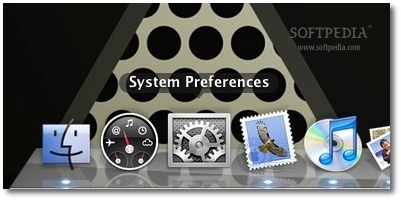
1. With your wireless mouse connected and working, launch System Preferences.

Review image

App Store Review Guidelines


Introduction

We're pleased that you want to invest your talents and time to develop applications for iOS. It has been a rewarding experience - both professionally and financially - for tens of thousands of developers and we want to help you join this successful group. We have published our App Store Review Guidelines in the hope that they will help you steer clear of issues as you develop your app and speed you through the approval process when you submit it.
We view Apps different than books or songs, which we do not curate. If you want to criticize a religion, write a book. If you want to describe sex, write a book or a song, or create a medical app. It can get complicated, but we have decided to not allow certain kinds of content in the App Store. It may help to keep some of our broader themes in mind:

Checklist for Submitting an App to the App Store

Before you can release a paid app to the App Store, you must agree to all of the paid app contracts, and submit your tax and bank routing info. This should be done in iTunes Connect. For best results you should fill this out before you even begin working on any apps, because it can take several weeks for the contracts to be approved by Apple.

Preparation

1. Complete all of the coding and testing on your app.
2. Update the Appname-info.plist file in your app.
  1. Set the bundle identifier (if you haven't already) to YourAppName. (Remove the com.apple.whatever stuff.) The Identifier should not contain spaces or funny characters - alphanumeric and dashes are ok.
  2. If you want your app to be named something different on the actual device than its name in Xcode, change the "Bundle display name" as well.
  3. Update the bundle version. If this is your first time submitting this app, the version number should probably be 1.0.
  4. Be sure the icon file is set.

Wednesday, March 21, 2012

Sahasranama app for iPhone and iPad


Sahasranama app is intended for everyone.Read these slokas while in commute,at the work place,at home,in the temple or when you are in a religious group.You no longer have to carry a book wherever you go.You are always a 'touch' away from this powerful mantra.With the availability of audio for Sahasranama stotra,you can listen to the stotras and read through the text at the same time for a better experience.We have added Vishnu's different avatar images with this application.We have added more features like the PDF File of sloga,MP3 File and Ring tone File with this application to share with your friend and your relation circle.

Tuesday, March 13, 2012

ios 5.1 with xcode 4.2 for iOS development


To get Xcode 4.2 on Snow Leopard to run code on a device running 5.1 you can do this:
If you have another Mac running Lion + XCode 4.3.1 you can copy the files from:
"/Applications/Xcode.app/Contents/Developer/Platforms/iPhoneOS.platform/DeviceSupport/5.1 (9B176)"
to the equivalent place on your SL Mac: probably "/Developer/Platforms/iPhoneOS.platform/DeviceSupport"
and also copy 'version.plist' from the Lion machine in the iPhoneOS.platform folder to the SL machine.
Re-start XCode on the SL machine and re-connect the devices and it seems happy enough.
[If you don't have access to a machine with Lion+4.3.1 you can get the files out of the 4.3.1 DMG which can be downloaded from Apple here: http://adcdownload.apple.com/Developer_Tools/xcode_4.3.1_for_lion/xcode_4.3.1_for_lion.dmg
then mount the DMG, Show Package Contents on the XCode icon and drill down to
/Volumes/Xcode/Xcode.app/Contents/Developer/Platforms/iPhoneOS.platform/DeviceSupport to
find the files mentioned above.]

Thursday, February 9, 2012

The Music Player Framework in iPhone

Getting started: MPMusicPlayerController

You need to add MediaPlayer.framework to your target in Xcode and #import <MediaPlayer/MediaPlayer.h>. To control music playback, we use an instance of MPMusicPlayerController. There are two types of music players. The iPodMusicPlayer is a reference to the music player instance used by the iPod app. Any settings you change, such as the shuffle or repeat modes, will be changed in the iPod app, too. If the iPod is playing when your application starts, the music will continue playing and you can access the current song and skip back and forward through the currently active playlist. When your app quits, the music will continue playing. I imagine this mode is very handy for most utility apps that try to improve your music listening experience by interacting with the iPod.
.

Friday, February 3, 2012

Developing RESTFUL iOS Apps with RestKit

What is RestKit?

RestKit is an Objective-C framework for iOS that aims to make interacting with RESTful web services simple, fast, and fun. It combines a clean, simple HTTP request/response API with a powerful object mapping system that reduces the amount of code you need to write to ‘get stuff done’. RestKit’s primary goal is to allow the developer to think more in terms of their application’s data model and worry less about the details of sending requests, parsing responses, and building representations of remote resources.

Wednesday, February 1, 2012

iOS 5 : UIStepper Control

There is a new pre-built control in iOS 5 for incrementing or decrementing a value, UIStepper. The control has two buttons aligned horizontally, one labeled with a plus (+) the other a minus (-).
One nice feature is a continuous option, wherein if the user presses and holds down either +/- button, the stepper value is incremented repeatedly. The longer the button is held down, the faster the increment will occur. Also, you can have the increment value wrap around when a range of values is specified, for example, if you set min and max to 0 and 99 respectively, when the value reaches 99, the next value will be 0 (and vice-versa).

Below is a screenshot that shows the output of the example code below:

Show the UITableView textField cell above the Keyboard when typing

Scenario:
Keyboard
Keyboard

Friday, December 23, 2011

Monday, November 28, 2011

How to convert PDF files to ePub files to read on your iPad with iBooks

This tutorial will guide you through the process of converting PDF files so that they can be read in iBooks, the iPad application.


Update: you can now read PDF files directly in iBooks, without having to convert them to .epub or any other format. See this tutorial for a quick overview of how to add PDF files to iBooks to read on your iPad, iPhone or iPod Touch.
This tutorial will remain up just in case someone wants to create an .epub of their PDF.
iBooks uses an ebook format called ePub. Using a free converter application (and ebook manager) called calibre you can quickly convert PDF (and other file formats) to .epub files, which you can then transfer to your iPad for reading in iBooks. This tutorial will take you step by step through the entire process.

Monday, November 21, 2011

How to Create an Iphone App Layout in Photoshop


Step 1:Setting up the Workspace

Okay! First step is to set up the workspace.Open Photoshop (For your help, I`m using Adobe Photoshop CS5) and create a new canvas of 1300×950 px.
setting up the workspace How to Create an Iphone App Layout in Photoshop
The layout will be 840px wide.Now, draw 2 vertical guides at 230px and 1070px to delimit the layout,like in the image.